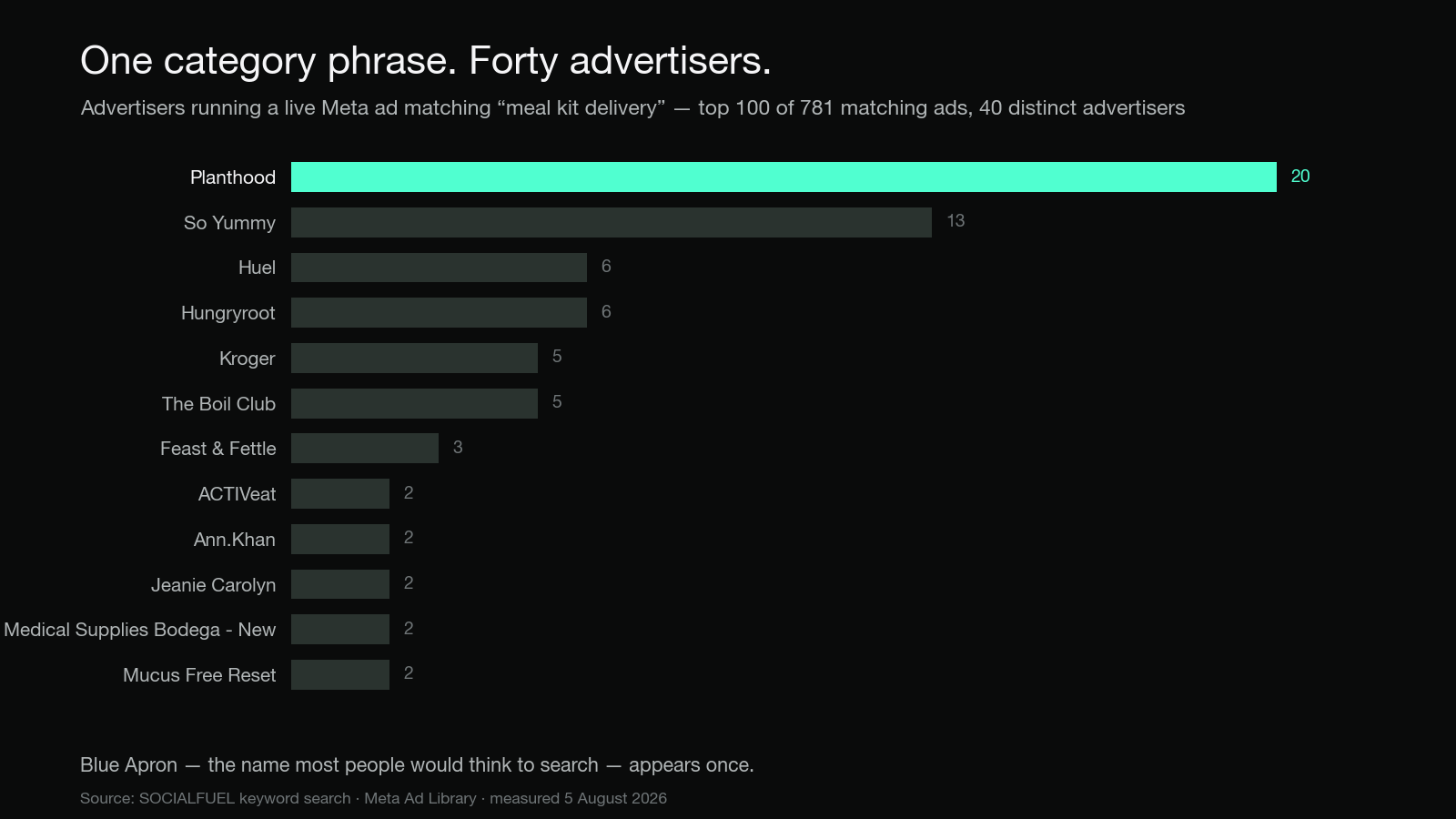
Every guide to competitor ad research starts the same way: "type your competitor's name into the Meta Ad Library." That is fine if you already know who they are. It is useless if your real problem is that somebody you have never heard of is bidding up your CPMs, or you are launching into a category you do not know yet.
The fix is to stop searching for names and start searching for language. Ad libraries index the text inside ads, so you can search the promise your category makes and get back every advertiser making it — including the ones you would never have thought to look up.
Here is the method in one block, then the detail.
- List the 8 to 12 phrases your buyer would recognise: the problem, the outcome, the objection, the offer.
- Search each phrase as ad text, not as a brand, with the country set to the market you sell in.
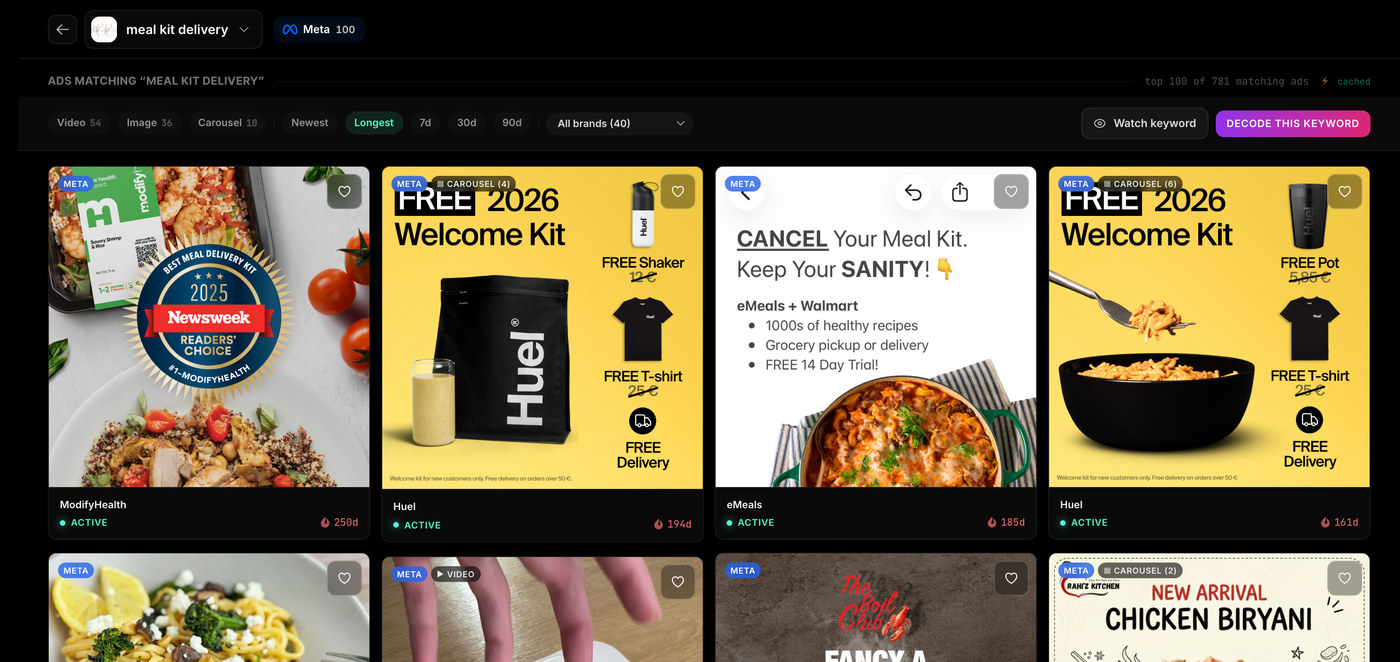
- Sort by longevity and ignore everything under a fortnight old.
- Note the advertiser Page behind each surviving ad. That list is your real competitive set.
- Repeat on Google and TikTok, which surface different advertisers and work differently.
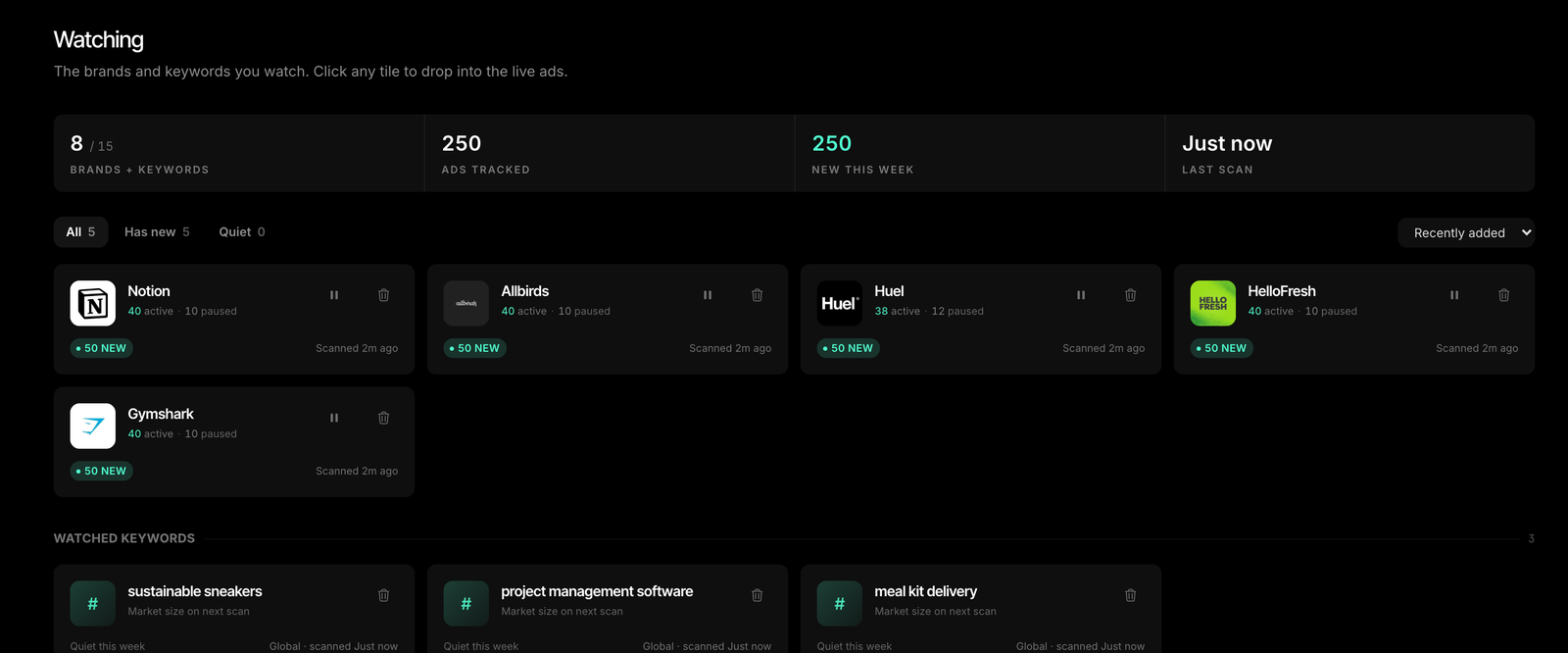
- Put the names you found on a watchlist so you see their next move rather than their last one.
Why brand-first research finds the wrong competitors
The competitors you can name are the ones you already lose to consciously. They are rarely the ones costing you money.
Brand-first research has three blind spots that keyword-first research does not:
- New entrants. A brand that launched six weeks ago is not on your list, but it is in the same auction. Keyword search finds it the moment it starts running ads.
- Indirect substitutes. Your buyer is not choosing between you and your named rival. They are choosing between solving the problem your way and solving it some other way entirely. Those advertisers use your language and share none of your category tags.
- Everything running under a different Page. Creator and partnership ads deliver through the creator's account, so they never appear under the brand Page you would have searched. Searching the copy finds them regardless of who is hosting them.
There is a fourth, subtler problem: searching a brand you already know tends to confirm what you already believe about the category. Searching the language tells you what the category is actually saying.
Step 1: Write down the words, not the names
Spend ten minutes building a phrase list before you open anything. Four buckets, two or three phrases each:
- The problem, in your buyer's words, not your marketing's. Not "suboptimal recovery" — "sore the next day".
- The outcome they are buying. "Sleep through the night." "Ready in 15 minutes."
- The objection that has to be beaten. "No lock-in contract." "Free returns." "Cancel anytime."
- The offer mechanics of your category. "First box", "starter kit", "free trial", "60-day guarantee".
The objection and offer buckets are the ones people skip, and they are the highest yield. Almost nobody advertises a category without eventually naming the thing that stops people buying, so searching the objection surfaces advertisers whose product descriptions look nothing like yours.
Step 2: Search the copy, not the company
The Meta Ad Library search box matches advertiser Page names and the text inside ads. So a phrase search returns live ads from every advertiser using that phrase in the market you have selected.
Two things to get right or the search silently lies to you:
Set the country deliberately. The library shows ads delivered to a country you choose, not ads run by companies based there. This is not optional and never has been: in Meta's own Ad Library API, ad_reached_countries is a required parameter. Every search you run is a search of one market, whether you picked it or not.
Set the category to "All ads." If it is left on "Issues, elections or politics", commercial advertisers return nothing at all. Meta's API separates ad types into ALL, POLITICAL_AND_ISSUE_ADS, HOUSING_ADS, EMPLOYMENT_ADS and FINANCIAL_PRODUCTS_AND_SERVICES_ADS, and the interface makes you choose one.
Search phrases the way an advertiser would write them, not the way a keyword tool would. Ad copy is conversational. "Ready in 15 minutes" appears in ads; "meal preparation time reduction" does not.
Step 3: Filter for survivors, not novelty
A keyword search returns everything, including the hundred ads a brand launched this week that will all be dead by Friday. That is noise, and it is the reason keyword research feels overwhelming.
Longevity is the filter. You cannot see anyone's results, but you can see how long an advertiser has chosen to keep paying for a creative, and that is the closest thing to validated performance observable from outside an ad account. Our study of how long Facebook ads actually run measured 560 live creatives from 19 brands and found only 11% survive past 90 days. The ones that do are carrying the account.
Practical rule: on a first pass, ignore anything under 14 days old. It has not been judged yet.
One trap worth naming, because it silently corrupts a lot of competitor research. A ranked page is not a sample. If you look at the first screen of results, sorted by whatever the default is, you are reading the top of a distribution and calling it the middle. We have measured the gap on our own data and it is not small. Either page through to the end of a keyword's results, or sort explicitly by longevity so you know precisely which slice you are looking at.
Step 4: Work backwards from the landing page
Once a phrase search gives you unfamiliar advertisers, the ad is only half the intelligence. Click through to where it lands.
The landing page tells you the offer, the price point, the guarantee and the funnel shape — the things the ad is deliberately not saying. A brand running an aggressive first-order discount in the ad and a subscription-only checkout on the page is telling you their entire economics in two clicks.
Note the advertiser Page name at this point, not just the brand name. Those two are often different, and the Page name is what you will need to track them later.
Step 5: Google and TikTok work differently
This is where most keyword-first research quietly stops, and where a lot of the value is.
Google does not do keyword search. Google's Ads Transparency Center is "a searchable repository of advertisers and the ads they've served on Google platforms like Search, Display, Gmail, and YouTube", and you search it "using the advertiser or website name" with filters for date and targeted location. There is no way to ask it "who is running ads that say X". So Google is a second step, not a discovery step: take the advertiser names you found on Meta, look each one up there, and you learn whether they are also buying intent, and what they say when the buyer is already searching.
TikTok does keyword search, in a limited geography. TikTok's Commercial Content Library exists to satisfy European regulation and covers ads delivered in the EEA, Switzerland and the UK. You can search it by keyword, which is genuinely useful — but a US-only advertiser returns nothing, and that is a fact about the library, not about the advertiser.
Knowing this asymmetry saves hours. Discovery happens where copy is indexed. Verification happens brand by brand.
What keyword search will not find
Be honest about the ceiling, because the gaps determine how you use the output.
- Anything not currently running. Meta's library is a place where "people can search for all active ads running across products from Meta". Commercial ads leave when they stop. Ads about social issues, elections or politics are the exception — those "are visible whether they're active or inactive and are stored in the Ad Library for 7 years".
- Ads whose message is carried by the video, not the caption. A three-word caption over a 30-second demo will not match your phrase list. Category and brand searches still matter for those.
- Spend, reach or results. Meta documents
spendandimpressionsas "Available only for POLITICAL_AND_ISSUE_ADS". Across 2,108 tracked Meta ad records from 21 brands, measured on 5 August 2026, zero carried a spend value and one carried an impressions value — a range of 0 to 999. Any competitor spend number you see elsewhere is modelled. - Who they are targeting. Outside the UK and EU, targeting parameters are not published at all.
Turn the list into a watchlist
The output of this exercise is a list of advertiser names you did not have before. That list decays, because the ads that produced it will be gone.
So make it standing rather than one-off: watch the brands you found, and watch the phrases that found them. Watching the phrase is the part people miss — a brand watchlist tells you what your known competitors do next, but a keyword watchlist tells you who arrives. A category phrase checked monthly will surface two or three new advertisers a quarter. Most are irrelevant. One or two are the reason your costs moved.
What you do with what you find
A pile of competitor ads is not a strategy. The useful output is a read on what the category has already validated, and where the gap is.
Read across the survivors and ask three questions. What promise appears in nearly every long-running ad? What offer structure keeps recurring? What does nobody say?
The answers are frequently uncomfortable and specific. When we read every live Meta ad from one large meal-kit advertiser, the split was clean: they ran most of their volume on outcome-led headlines, but every ad still running past 60 days was an offer ad. Two different things were true at once — what they were testing, and what was surviving. You only see that by reading the whole set rather than the top of the page.
Category language also varies far more than people expect. Our analysis of how long Facebook ad copy should be measured 511 live ads across 17 brands and found per-brand median copy lengths ranging from 28 characters to 395. Copying the wrong neighbour's format is worse than having no benchmark at all.
Frequently asked questions
How do I find competitor ads if I don't know who my competitors are?
Search the language instead of the name. The Meta Ad Library matches text inside ads, so searching a phrase your category uses — the problem, the outcome, the objection, or an offer term like "first box" or "cancel anytime" — returns live ads from every advertiser using it in the country you have selected. The advertiser Pages behind those ads are your real competitive set.
Can you search the Facebook Ad Library by keyword instead of brand?
Yes. The search box matches both advertiser Page names and ad text. Two settings must be right or you get nothing: the country selector, because ads are indexed by the country they were delivered to, and the ad category, which must be set to "All ads" rather than "Issues, elections or politics".
Can you search Google's Ads Transparency Center by keyword?
No. Google's Ads Transparency Center is searched "using the advertiser or website name", with filters for date and targeted location. It cannot be queried by ad text. Use Meta or TikTok to discover advertiser names, then look each name up in Google's tool to see whether they also buy search.
Does TikTok have a keyword-searchable ad library?
Yes, with a geographic limit. TikTok's Commercial Content Library supports keyword search but covers ads delivered in the EEA, Switzerland and the UK. Searching a US-only advertiser returns nothing, which reflects the library's scope rather than the advertiser's activity.
How do I know which of the ads I find are actually working?
You cannot see performance, so use longevity. An ad still running after months has survived repeated budget decisions. In our measurement of 560 live creatives across 19 brands, only 11% were still running past 90 days, so anything that old is a strong signal. Ignore ads under 14 days old on a first pass.
How many keywords should I track?
Start with 8 to 12 phrases covering the problem, the outcome, the objection and the offer. That is enough to surface the advertisers you are missing without producing a list you will never read.
Is keyword ad search free?
The underlying libraries are free and public. Meta and TikTok both require no login for basic search. What costs money is doing it repeatedly across markets and platforms and keeping a record, since commercial ads are deleted from the libraries when they stop running.
Do this for your own category
All of this is possible by hand. It is just slow: one library at a time, one country at a time, one phrase at a time, with no memory between sessions.
SOCIALFUEL does it in one place. Switch the search from Brands to Keywords, type the phrase your category actually uses, and get live ads from every advertiser running it across Meta, Instagram and TikTok — then sort by Longest to put the survivors on top, and decode any individual ad down to its hook, angle, offer and likely audience. Brand searches cover Google as well. Free to start, no credit card, no ad-account connection.
If you are comparing tools first, we have written up the field in best ad spy tools, with direct comparisons for Foreplay, Adspo and Konvert.
About the author
Joel Helou is the founder of SOCIALFUEL, a growth agency that manages paid social and search campaigns for ecommerce and DTC brands, and the creator of socialfuel.io. He has spent the past decade buying media for brands across apparel, supplements and consumer goods, and now builds the tooling his own team uses to decode why competitors' ads work. The ad-record figures in this article were measured on 5 August 2026 through that platform.